


 PatientOS (pronounced Patient-oh-es where O and S stand for Open Source) has been designed from the outset to be a Healthcare Information System (HIS). The software architecture, design patterns and framework has been built for the complexities and challenges of an enterprise wide information system. Internationalization, and localization is expected, even translation into multi-byte languages such as Japanese.
Healthcare is a noble field and clinicians deserve software which is of the same quality as other industries. PatientOS was designed to address the prevalent industry issue with todays software:
- User friendly? PatientOS has been designed to optimize the experience of clinicians by making functions fast, easy and simple to customize to the workflow of the users. The right default values, consistent layout, the fewest clicks, use the keyboard, and scripting behind the scenes to save work and automate actions.
- Fits your workflow? Rather than decide how clinicians must use the system the screens, process and workflow can be tailored to a user, role, clinic or hospital. The system will support and NOT CHANGE your best practices.
- Enjoy Upgrades? Users and system administrators often fear upgrades. The PatientOS upgrade process is fast and simple. Due to key specifics of the architecture the database schema, code and content are synchronized in a natural way that minimizes programming errors surfacing after upgrades.
- Functionality Coming Soon? As information systems mature they become larger and more complex and require more and more resources to get new functionality in without breaking existing functionality. PatientOS has been carefuly designed to grow to the largest size while remaining functional and enjoyable to maintain.
- Open Source? With Open Source there code quality is transparent, open for all to see. This adds a lot of value for support companies and healthcare analysts to troubleshoot and gain true knowlege of the system functionality.
- Support? With PatientOS more and more companies will support the software allowing you the freedom to choose who you wish to do business with.
- Cost? PatientOS is free.
- Free? PatientOS is Free to download. Free to own. Free to distribute. Free to sell or re-sell. In fact we will help any company with their sales. Of course there is no free lunch as you still have hardware costs and the time for you (or someone you pay) to install and support the software. However PatientOS is designed to require the minimum amount of maintenance to ensure support costs are as low as possible. Note that PatientOS integrates (optionally) with some of finest commercial drug and code database which do have licensing costs.
PatientOS Features
Common to all modules
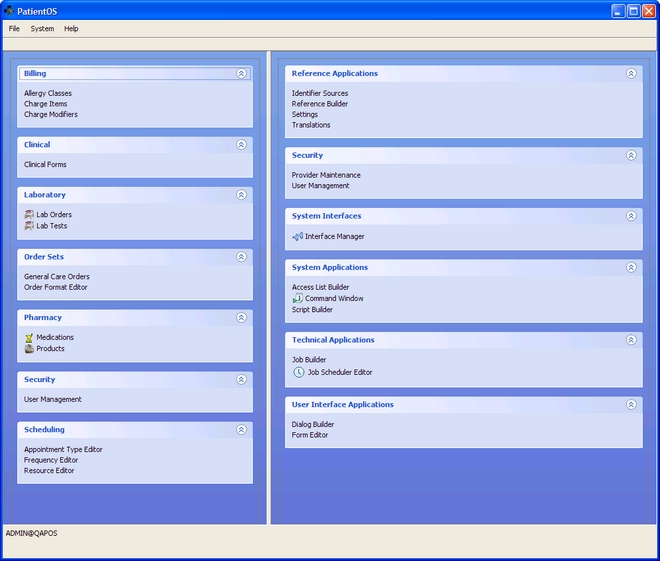
- Unlimited number of forms can be created using the Form Editor.
- Unlimited number of orders, appointment types, resources, or any other entity can be created using the respective Editor.
- Every menu and toolbar can be customized per user, per role, per group using the Form Editor.
- Every view, table, form, controls can be customized per user, per role, per group using the Form Editor.
- Every visual piece of text can be translated to another language.
- Javascript allows custom user interface interaction.
Registration
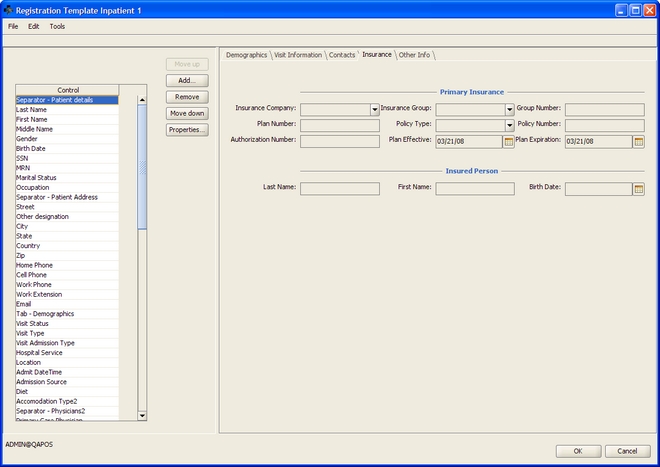
- Quick reg, outpatient, inpatient and custom registration forms can be created using the Form Editor.
- Enforce required fields, created custom data entry rules, highlight recommended fields, check formats, auto populate fields.
- Generate HL7 Interface transactions for ADT outbound (ADT^A01-8).
- Export and import patients to and from XML.
Scheduling
- Day, Week, Month views for provider, multiple providers or other resources.
- Appointment types with any duration, multi-block staggered duration, or color can be created using the Appointment Type Editor.
- Resources with custom schedules can be created using the Resource Editor.
- Schedules with recurring blocked times, double or any amount of overbooking inserting slots can be customized at specific times.
- Schedules can be blocked off as needed.
- Users can personalize the resources viewed.
Result Viewing
- View test results in a compact grid format.
- View results received from an HL7 interface with a lab system (ORU^R01).
Clinical and Administrative Forms
- Unlimited number of custom forms using the Clinical Forms Editor.
- Define your own fields and data elements to capture.
Medications
- Integration with Medispan supplemented with PatientOS screening
- Drug-drug interaction checking.
- Allergy checking.
- Dose checks.
- Adverse drug effect checking against medical conditions.
Prescriptions
- Prescription wizard with dispense and dose instructions
Laboratory
- Unlimited number of lab tests can be created using the Lab Test Editor.
- Generate HL7 Interface transactions for orders outbound (ORU^O01).
Orders
- General care orders can be created using the General Care Order Editor.
- Lab orders with standard or custom tests can be created using the Lab Order Editor.
- Custom order entry fields can be created using the Form and Order Format Editor.
Charges
- Charge item master.
- Manual charge entry into the patient chart.
Patient Portal
- Assign patients a patient portal login.
- Sample Patient form that writes directly to the chart.
- Mass email patients.
Reports
- Create standalone reports using iReport.
- Generate server side SQL reports for client viewing.
- Generate XML based reports to leverage domain models.
System
- Manage users and multiple roles per user using the User Editor.
- Create custom batch jobs for repeated execution.
- Create custom schedules for batch jobs.
- Import/Export users to XML for system or environment migration.
Get more information here http://www.patientos.org
| < Prev | Next > |
|---|



 In this section you'll find a list of companies and organizations working in the healthcare IT sector in Egypt.